
Boat Trader
Boats Group LLCAuto & Vehicles
4.63.04K Reviews
- Version
- 1.32.1
- Installs
- 1.00M
- Age Rating
- Everyone
Screenshots
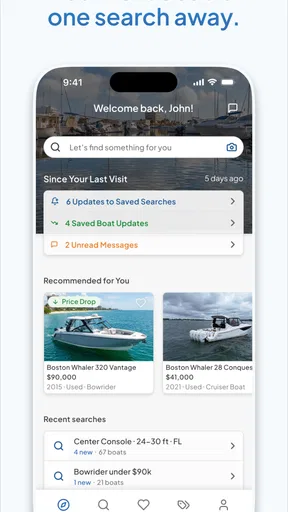
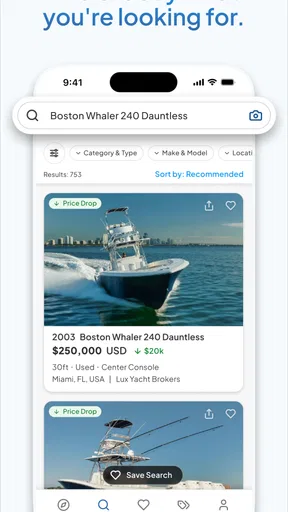
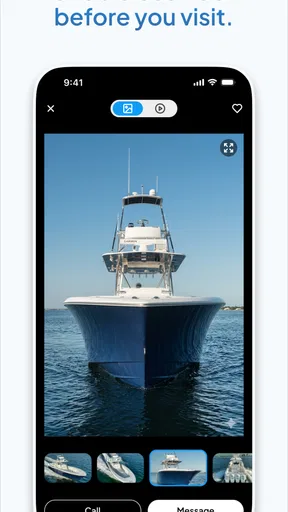
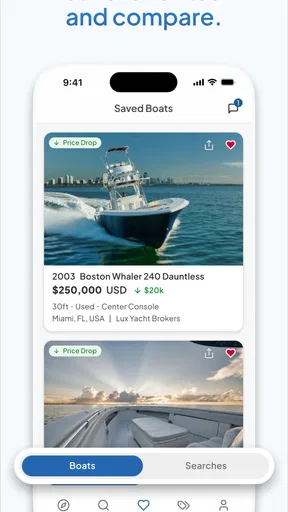
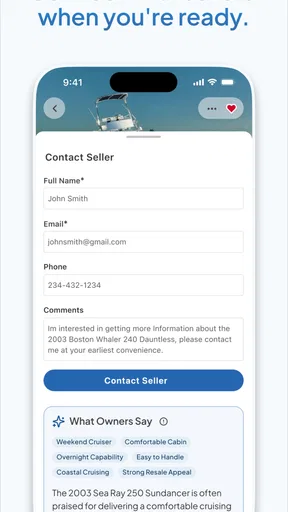
Our Review of Boat Trader
 Analysis by Appyee
Buying a boat is rarely a quick, casual purchase, and selling one is not much easier. You need to compare layouts, engines, locations, conditions, and prices while separating a genuinely suitable boat from an attractive listing that does not fit your plans. I found Boat Trader useful because it puts that search-and-sale process into a mobile app rather than leaving me tied to a desktop browser. It is a free Auto & Vehicles app from Boats Group LLC, aimed at people who want to buy or sell a boat from an Android device.
My first impression was that it works best as a focused marketplace companion, not as a complete replacement for inspecting a boat, speaking with a seller, or checking the practical costs of ownership. It helps narrow the field and keeps promising listings close at hand, but the important decisions still happen outside the screen. That balance is central to my opinion: Boat Trader is strongest during the discovery and comparison stages, while it becomes less decisive when you need independent verification or a final purchasing judgment.
How Boat Trader fits into a real boat search
The app’s purpose is straightforward: browse boats for sale and create a path toward selling one. That clear focus makes it easier to use than a broad classified app where boats sit alongside unrelated vehicles, furniture, and local listings. When I open it with a particular type of boat in mind, the experience feels more relevant because the search is centered on the details that matter to boat buyers rather than on general marketplace browsing.
I would use it in three stages. First, I would explore the market to understand what is available in the areas that interest me. Second, I would save or revisit promising listings while comparing their asking prices, specifications, and presentation. Third, I would contact sellers and arrange the conversations and inspections that the app itself cannot replace. Thinking of it this way prevents a common mistake: treating a polished listing as proof that the boat is ready to buy.
The app has a useful role even before I am ready to purchase. Someone considering a move from a small runabout to a larger cruiser can browse examples and learn which compromises appear repeatedly. A first-time buyer can also get a better sense of how location, age, equipment, and condition affect the selection. The value is not only finding one boat; it is building enough context to ask better questions.
For sellers, the attraction is reach. A boat that would otherwise be shown only through a local sign, a marina contact, or a general classified listing can be presented to people already looking for boats. That does not guarantee a quick sale, but it can improve the chance that an interested visitor understands the listing’s purpose immediately. I would still prepare the photos, description, paperwork, and asking price before uploading anything, because the app can display an offer but cannot make a weak presentation persuasive.
Speed expectations during ordinary browsing
In everyday use, I expect the app to feel most responsive when I am doing one simple thing at a time: opening a listing, reviewing its information, or moving through search results. The experience is naturally more demanding when I repeatedly change location, adjust several criteria, and open many boat pages in succession. That is not unique to this app; marketplace searches have more work to do when the result set changes constantly.
My practical advice is to begin broadly, then narrow the search deliberately. Starting with an exact combination of preferences can make the process feel restrictive and may hide useful comparisons. I would first identify the relevant region and general boat type, then refine by the characteristics that genuinely determine whether the boat fits my plans. This workflow reduces unnecessary back-and-forth and makes price comparisons more meaningful.
A second useful habit is to pause before opening every result. Listing photos can encourage rapid scrolling, but the written details often determine whether a boat deserves attention. I would shortlist a manageable group, examine each one carefully, and record questions while the information is fresh. That approach is faster in the larger sense because it avoids repeatedly returning to attractive listings that were never realistic choices.
Boat Trader also benefits from the fact that it is a dedicated app rather than a general marketplace feed. I do not have to mentally filter out unrelated categories. Still, dedicated does not mean instant. The quality of the experience depends on the amount of information in each listing and on how carefully the seller has prepared it. A sparse listing may open quickly but leave me with more work afterward, while a detailed one takes longer to assess but can save a needless call or trip.
What happens during a heavy-use session
The most demanding session for me would be a weekend search in which I compare many boats across several areas, revisit listings, and switch between browsing and seller contact. This is where organization matters more than raw speed. Without a simple plan, it is easy to lose track of why one boat looked promising or to confuse similar listings.
I would divide that session into passes. In the first pass, I would eliminate boats that clearly fail on location, size, intended use, or budget. In the second, I would compare the remaining listings side by side in my notes, paying attention to differences that photographs do not communicate well. In the final pass, I would prepare specific questions for sellers. This makes the app a research tool rather than an endless scrolling feed.
One non-obvious advantage of this method is that it exposes trade-offs earlier. A cheaper boat may be farther away, older, or less aligned with the way I plan to use it. A more attractive listing may have a presentation that says little about maintenance or ownership history. By writing down the reason each listing remains on my shortlist, I can distinguish genuine value from visual appeal.
Heavy use also reveals a limitation: the app cannot remove the emotional side of boat shopping. A dramatic photograph or an appealing interior can make me overlook transportation, storage, inspection, and running costs. I would therefore treat each listing as an invitation to investigate, not as a recommendation. The app helps me find candidates; it does not certify them.
Reliability, recovery, and confidence in the workflow
My confidence in Boat Trader comes from its established presence as a boat-focused marketplace and from the size of its user base. It has an average rating of 4.6 from around twenty thousand ratings, with roughly three thousand written reviews, and it has passed one million installs. Those figures suggest that the app is used widely enough to be a familiar option for people shopping in this niche.
That said, app reliability and listing reliability are different things. Even if the application opens and displays information properly, a seller may update a boat’s status elsewhere, respond slowly, or describe its condition too optimistically. I would never interpret a smooth browsing session as evidence that a particular listing is current or mechanically sound. Before traveling, I would contact the seller and confirm that the boat is still available and that the key details remain accurate.
Recovery is especially important in a marketplace app. If I lose track of a listing, close the app, or return to the search later, I want a workflow that lets me reconstruct my shortlist without starting from zero. My solution is simple: save the most promising listings when the app allows it, and keep a short external note with the boat’s identifying details and my questions. That small backup protects me from relying entirely on memory.
I also recommend taking screenshots or notes of important listing information before making travel arrangements. Listings can change, and a detail that seemed clear during an evening search may be harder to locate later. This is not a criticism of Boat Trader alone; it is sensible behavior whenever a marketplace listing influences a costly decision.
The app’s free price makes it easy to keep available during a longer search. There is no financial barrier to installing it and checking the market before deciding whether boat ownership is realistic. For me, that encourages a slower, more informed process: I can observe the kinds of boats available in my preferred area before committing time and money to viewings.
Device constraints and practical comfort
Boat Trader supports Android devices running version 7.0 or later, which covers a broad range of phones. That matters for users who keep an older phone as a work, travel, or marina device. It also means the app is not limited to people who replace their handset frequently.
Screen size still affects how comfortable the experience feels. A larger phone makes detailed listing information and photographs easier to inspect, while a small screen encourages quick scanning rather than careful comparison. I would use a phone for discovery, shortlisting, and contacting sellers, but I would prefer a larger display when reviewing several candidates in depth.
Older hardware can also influence the feeling of speed during repeated browsing. A device with limited free storage or many apps running in the background may make any marketplace session feel less fluid. I would close unnecessary apps before a long search and keep the operating system in a stable condition. Those are ordinary maintenance steps, but they matter when I am opening many image-heavy listings in one sitting.
For people who spend time near marinas or traveling to view boats, device planning is worth considering. A phone battery can disappear quickly when used for navigation, photographs, calls, and a long marketplace session on the same day. I would save essential notes before leaving and carry a charger or power bank. The app can help me organize the visit, but it should not be the only place where the appointment details exist.
Accessibility also depends on how each seller presents information. Clear descriptions and well-chosen photographs make a listing easier to evaluate on a phone. Poorly organized text or incomplete details create friction regardless of the device. This is another reason I would judge the quality of each individual listing separately from my overall opinion of the application.
Comparing it with the usual alternatives
The most obvious alternative is a general classified marketplace. That option may be useful when I want to search across many types of goods or find a private local seller, but it usually requires more filtering and more caution around inconsistent descriptions. Boat Trader’s narrower purpose gives it an advantage when the search itself is the priority. I spend less time explaining to the marketplace what kind of item I am looking for.
A dealer’s own website can be better when I already know which dealership or brand I want to visit. Dealer pages may provide a more direct relationship and clearer business context. They are less useful, however, when I want to compare a broad range of sellers and locations in one place. I would use Boat Trader for market discovery, then move to a dealer’s own communication channel when a particular seller becomes serious.
In-person marina browsing has a strength that no phone app can match: I can see the environment, speak with people nearby, and sometimes notice practical details that photographs omit. It is also slower and geographically limited. Boat Trader is better for deciding which marinas or sellers deserve my time before I make the trip.
Professional brokers and marine surveyors serve a different purpose. They can bring experience and inspection knowledge that a marketplace app cannot provide. If I am buying an expensive or technically complex boat, I would not choose the app instead of professional help. I would use it to build a shortlist, then rely on qualified inspection and documentation for the final decision.
Who should use it, and who should skip it
I think Boat Trader is a good fit for buyers who are still learning the market, owners comparing upgrade options, and sellers who want their boat presented in a dedicated marketplace. It is also useful for anyone whose search crosses several locations, because browsing remotely can prevent wasted trips. The free access makes it reasonable to install even when I am only researching future possibilities.
I would be more cautious recommending it to someone who wants an immediate, fully verified purchase. The app is not a substitute for a sea trial, a survey, ownership checks, maintenance records, or a realistic calculation of storage and operating expenses. A buyer who dislikes doing independent research may find the marketplace format frustrating because it creates possibilities rather than delivering a final answer.
It may also be the wrong first choice for a person who already has a trusted local dealer and knows exactly which boat they want. In that situation, a direct conversation can be more efficient than browsing a large selection. Likewise, a seller with a very unusual boat may need specialist networks or personal contacts in addition to a broad marketplace listing.
One of my favorite practical uses is planning a viewing day. I would shortlist boats that are close enough to combine into one trip, contact each seller first, and ask the same core questions so the comparisons remain fair. The app supplies the discovery layer, while my notes and calls turn that discovery into a useful itinerary.
My performance verdict after using it as a marketplace tool
Boat Trader feels most valuable when I treat it as a structured way to explore, compare, and prepare. It is not trying to replace the physical reality of boat ownership, and I would not want it to encourage that illusion. The application reduces the effort required to find relevant listings, but the quality of the final decision still depends on the questions I ask and the checks I arrange.
Its dedicated Auto & Vehicles focus, free availability, and broad adoption make it an easy app to keep nearby during a serious search. Boats Group LLC has built a product whose purpose is clear, and the current version, 1.29.3, gives users a current entry point into that marketplace. The Everyone age rating also makes it broadly approachable for families researching a purchase together, although the financial decision itself obviously calls for adult judgment.
My honest recommendation is to install it if you want to understand the boat market, compare candidates across locations, or prepare for conversations with sellers. Use it actively, but use it with discipline: shortlist instead of endlessly scrolling, confirm availability before traveling, and keep independent notes for important details. Boat Trader is a strong starting point for finding the right questions and the right boats, but not the final authority on whether a boat is truly right for you.
That distinction is what makes the app worthwhile in my experience. It saves time at the beginning of a purchase or sale, helps turn a vague wish into a practical shortlist, and gives sellers a focused place to reach interested buyers. I would pair it with direct communication and professional checks whenever the stakes are high. For anyone approaching boat shopping with that realistic mindset, Boat Trader is a useful companion rather than a promise of an effortless transaction.
Privacy and Permissions
See what permissions an app requests and how it handles your data.
- Location
- approximate location (network-based), precise location (GPS and network-based)
- Photos/Media/Files
- read the contents of your USB storage, modify or delete the contents of your USB storage
- Storage
- read the contents of your USB storage, modify or delete the contents of your USB storage
- Camera
- take pictures and videos
- Wi-Fi connection information
- view Wi-Fi connections
- Other
- view network connections, full network access, prevent device from sleeping
Verdict
Strengths of Boat Trader
- Large selection of new and used boats from dealers and private sellers.
- Detailed listings include photos, specifications, prices, and seller information.
- Search filters make it easy to narrow results by type, location, price, and size.
- Saved searches and favorites help you track interesting boats over time.
- Useful for comparing boats and contacting sellers directly from the app.
Limitations of Boat Trader
- Listing quality and detail can vary significantly between different sellers.
- Some boats may be sold before listings are removed from the marketplace.
- The app may request location and notification permissions for full functionality.
- Premium or dealer listings can make some search results feel promotional.
- Availability and features may differ depending on your region.
Other Releases by Boats Group LLC
View All
YachtWorld
Auto & Vehicles4.3
Similar Picks in This Category
View All
Android Auto
Google LLC4.1

maxim — order a taxi & food
PT. SITO4.7

Штрафы ГИБДД: проверка с фото
Pays LLC – Штрафы ГИБДД4.7

Номерограм – проверка авто
Авто Ассист4.8

Дром Авто
Дром4.9

Frequently Asked Questions
What is Boat Trader, and what can I use it for?
Boat Trader is an online marketplace for browsing boats listed by dealers, brokers, and private sellers. You can search for new or used boats by type, brand, price, location, length, and other specifications. Listings typically include photos, descriptions, equipment details, and seller contact information, making the app useful for researching options or contacting sellers about a potential purchase.
Can I buy a boat directly through the Boat Trader app?
Boat Trader generally helps you discover boats and connect with sellers rather than completing the entire purchase inside the app. After finding an interesting listing, you normally contact the dealer, broker, or private seller to ask questions, arrange a viewing, discuss financing, and negotiate the sale. Always verify ownership, condition, documentation, and the seller’s details before sending money or signing an agreement.
Does Boat Trader include both new and used boats?
Yes, Boat Trader commonly features a broad selection of new and pre-owned boats, including fishing boats, pontoons, center consoles, cruisers, sailboats, personal watercraft, and other marine vehicles. Availability depends on current listings and your location. Use the filters carefully, because prices, specifications, included equipment, and seller information can vary considerably between advertisements.
Is Boat Trader free to download and use?
The Boat Trader app is generally available to download without an upfront charge, and users can browse many listings and contact sellers through the platform. However, individual sellers or dealers determine the advertised boat prices, and additional costs such as taxes, registration, insurance, transportation, inspections, maintenance, and financing may apply. Check the current store listing for any changes to access or features.
How can I avoid problems when responding to a Boat Trader listing?
Treat every listing as a starting point for research, not as a guarantee of the boat’s condition or the seller’s claims. Review the photos and specifications carefully, ask for maintenance and ownership records, inspect the boat in person, and consider hiring an independent marine surveyor. Be cautious with unusually low prices, pressure to pay quickly, wire-transfer requests, or sellers unwilling to meet or provide documentation.
